
mybyram: Medical Supply Orders
Accendra HealthMedical
4.61.47K Reviews
- Version
- 1.5.2
- Installs
- 100.00K
- Age Rating
- Everyone
Screenshots
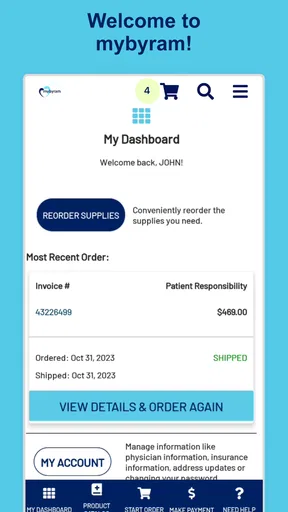
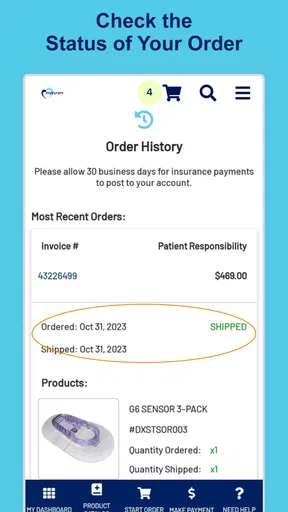
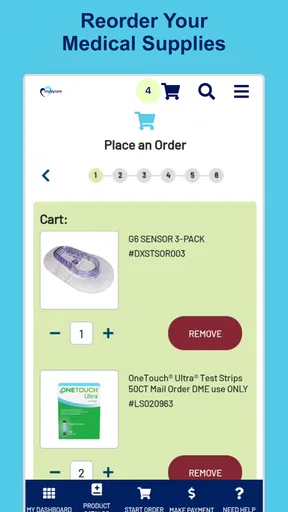
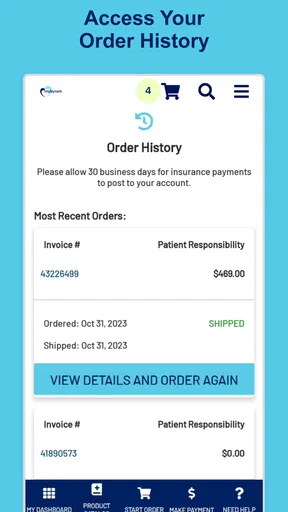
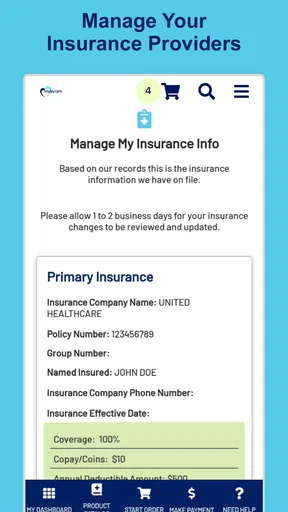
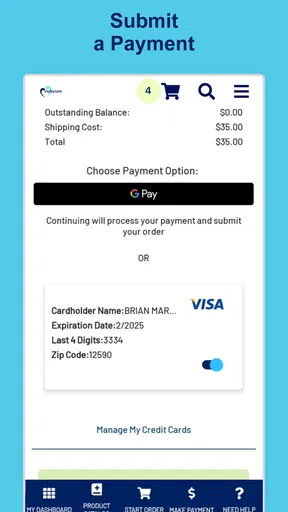
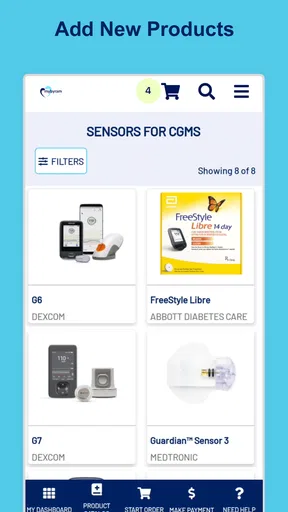
Our Review of mybyram: Medical Supply Orders
 Analysis by Appyee
I found mybyram: Medical Supply Orders most useful when I treated it as a focused account tool rather than a complete medical-care companion. It is a free medical app from Accendra Health, built around accessing a mybyram account and reordering medical supplies. That narrow purpose is also its main strength: when I already know what I need, I can avoid searching through a broader shopping experience and go straight to the supply-ordering task.
That focus matters for people who depend on recurring medical products. A reorder can be a routine errand, but it can also become stressful when it is delayed by poor organization, difficult reading, or too many steps. In my experience, the value of this app is less about discovering new products and more about reducing the amount of account handling involved in a familiar purchase. It is designed for Everyone, runs on Android 7.0 or later, and its current version is 1.5.2.
How mybyram handles readability and navigation
The first thing I noticed is that the app’s purpose is easy to understand. The name and medical-supply focus set a clear expectation, and the central workflow is not buried under unrelated health content. For an existing customer, that can make the opening experience feel more direct than using a general browser, where account pages, product pages, and support information may compete for attention.
That simplicity can be especially helpful for someone who has limited energy, is managing a chronic condition, or simply wants to complete an order without making several decisions. The app is not asking me to interpret medical information or compare a large range of treatments. Its practical job is to connect me with my account and help me reorder supplies. A focused interface is often easier to understand than a feature-heavy health platform.
I would still approach the navigation with realistic expectations. A short task is not automatically an accessible task. Account sign-in, identifying the correct supply, reviewing an order, and confirming the reorder all require attention. If a person has difficulty reading small text, distinguishing similar product names, or remembering account credentials, the app’s narrow design does not remove those challenges. It only limits the amount of unrelated material in the way.
One useful habit is to decide what I need before opening the app. If I have the product details, preferred quantity, and account information ready, I can use the app as a quick reorder route instead of turning the session into a search exercise. This is a small but important distinction: the app appears best suited to a known repeat purchase, not to browsing unfamiliar medical supplies.
The app has attracted a 4.6 average from around 15K ratings, with roughly 1.5K written reviews. It has also passed the 100K-install mark. Those figures suggest that the focused account-and-reorder idea is resonating with a meaningful group of users, although they do not tell me whether every person will find the interface equally comfortable. My own recommendation is to judge it by the specific task you perform most often: repeat ordering is the clearest test.
Why a focused reorder path can help
Compared with calling customer service for every repeat order, an account app can give me more control over timing. I can begin the process when it fits my day rather than waiting for an office response. Compared with a mobile browser, a dedicated app may feel less distracting because I am not moving through a full website layout. That said, the browser remains a sensible alternative for anyone who prefers larger-screen navigation, desktop password tools, or a familiar web page.
The trade-off is that a focused app may feel limited when I need help beyond ordering. If I am trying to understand insurance paperwork, resolve an unusual supply issue, or ask a clinical question, I would not expect a reorder-centered app to replace a support channel or healthcare professional. Keeping that boundary clear prevents disappointment and also makes the app easier to evaluate fairly.
Motor, sensory, and cognitive considerations in everyday use
Medical supply ordering is often done by people dealing with fatigue, pain, reduced dexterity, vision changes, or temporary illness. In that context, every unnecessary tap matters. A compact ordering workflow can reduce physical effort when compared with repeatedly navigating a full retail site, especially for a person who already knows the account and product they use.
However, I would not describe the app as a universal solution for every ability. The available product information does not establish accessibility certifications or guarantee compatibility with every assistive setup, so I would test it on the actual device and with the tools I rely on. This is particularly important for screen-reader users, people who use enlarged text, and anyone who needs strong contrast or alternative input methods.
For users with limited hand movement, the most practical approach is to prepare before starting. I would keep the phone supported on a stable surface, use a device setting that makes text comfortable, and avoid beginning an order when I am rushed. If typing account details is tiring, a trusted password manager or the device’s built-in autofill may reduce repeated finger movement, provided that the person is comfortable with the security arrangement.
There is also a sensory consideration that is easy to overlook: medical products can have similar names, packaging, or descriptions. A person with low vision, dyslexia, or cognitive fatigue may benefit from slowing down at the product-review stage rather than treating a familiar reorder as automatic. I would compare the item carefully with the supply already in use and ask a caregiver to verify it when the consequences of a mistake would be serious.
For someone supporting a family member, the app may be useful as part of a shared routine, but I would not assume that account access should be shared casually. The person placing the order should understand whose account is open, which supply is selected, and where the order is being sent. A simple checklist can help: confirm the account, match the product, review the quantity, and save the confirmation details in a place the household can find.
A realistic reorder scenario
Imagine that I am helping a relative who uses the same medical supplies every month. The relative notices that the current stock is getting low while resting at home. Instead of searching the web for the supplier, I open the app, access the mybyram account, locate the familiar reorder path, and review the item before submitting it. The relative can concentrate on confirming the product rather than navigating a general marketplace.
That scenario shows where the app earns its place. It can turn a recurring administrative task into a planned routine. I would set a personal reminder outside the app, because an ordering tool is not the same thing as a supply-level alert or a clinical monitoring system. Then I would use the reminder to check the remaining stock, open the account, and verify the order details while there is still time to correct an error.
The same situation also reveals the limitation. If the relative has changed products, needs a different size, or is unsure whether a replacement is appropriate, I would pause rather than rely on the reorder shortcut. The app can help execute a known order, but it should not make a medical decision on the user’s behalf. In that case, a clinician, supplier representative, or another appropriate support route is the better option.
Situational access: when the app fits and when another route is better
I see the strongest use case in quiet, planned moments: at home, with a stable internet connection, enough battery, and the relevant account details available. The app’s free price removes one obvious barrier to trying it, and the Everyone age rating makes it suitable for a broad audience in terms of store classification. Still, the person using it may need help with the medical or account decisions involved.
It can also be practical when a caregiver is coordinating several recurring tasks. A caregiver may use the app to handle the account while the patient confirms the exact supply. That division of responsibility is better than having one person guess, especially when supplies look similar or the reorder schedule has changed. I would keep a written record of what was requested and when, rather than assuming that opening the app means the task is finished.
For users who are away from home, the app’s usefulness depends on the situation. A phone is easier to carry than a computer, but a small screen can be harder to inspect when lighting is poor or when someone is experiencing visual fatigue. I would avoid placing an important order in a noisy public setting if I cannot carefully review the item. If the connection is unreliable, I would wait until the session can be completed without interruption, since a half-finished account task creates uncertainty.
The app is less compelling for a person who rarely orders through this supplier, wants to compare many options, or prefers speaking with a representative. A desktop browser may be better for users who need a large display and keyboard. A phone call may be better when the order is unusual, the account needs explanation, or the user cannot comfortably manage digital forms. Neither alternative makes the app bad; they simply fit different access needs.
I also would not use this app as a substitute for emergency help, diagnosis, medication guidance, or supply troubleshooting that could affect health. Its role is administrative and transactional. That clear boundary is reassuring because it prevents me from expecting clinical features that a reorder tool is not designed to provide.
Remaining barriers that affect inclusive use
The biggest barrier is the gap between a simple purpose and the complexity of the surrounding account process. Someone may understand exactly what they need but still struggle with passwords, identity checks, product selection, delivery details, or confirmation screens. These are not unusual problems, yet they matter more when the order concerns essential medical supplies.
Another barrier is confidence. A user who has previously received the wrong item may hesitate to use a quick reorder flow, even if it is convenient. I think the safest approach is to treat speed as optional. The app should help me move efficiently, but it should never pressure me into skipping the review step. A slower, deliberate confirmation is worthwhile when the supply is important.
Caregivers should also consider privacy and independence. Helping someone place an order can be supportive, but taking over every step may leave the account holder unsure about what was requested. Where possible, I would let the person receiving the supplies make the final confirmation, while the caregiver handles typing or navigation. This approach supports both accuracy and dignity without claiming that the app itself provides a special accessibility mode.
There is a practical continuity issue as well. The app was released on April 16, 2021, and its current version is 1.5.2. I would keep the application updated through the normal app-store process and check that the phone still meets the Android 7.0 minimum before relying on it. People using older devices should test their complete ordering routine ahead of time, not when supplies are nearly exhausted.
Finally, the app cannot solve every barrier created by a person’s environment. A user may have limited data, an older phone, no private place to enter account information, or no one available to double-check a product. In those circumstances, a browser on a larger device, a trusted caregiver, or direct supplier support may offer a safer and more comfortable route. Inclusive design is not only about the interface; it is also about whether the whole ordering situation works for the person.
My inclusive verdict on the ordering experience
After looking at the app through the needs of different users, I see it as a practical specialist tool rather than a complete accessibility answer. Accendra Health has kept the purpose clear: access a mybyram account and manage repeat medical-supply orders. That clarity can reduce navigation fatigue, particularly for people who already know the product they need and want a mobile alternative to a broader website or phone call.
The best reason to use it is predictable, repeat ordering with a careful final review. I would recommend it to existing mybyram customers who prefer handling routine supplies on a phone, to caregivers who can support the account process, and to users who find a dedicated task easier than a general web experience. I would also use an external reminder and a simple product-check routine, because convenience should not replace planning.
I would hesitate to recommend it as the only option for users who need extensive assistance technology support, large-screen browsing, complex product guidance, or personal help with unusual orders. Those users may be more comfortable with a desktop browser, a supplier representative, or a trusted caregiver working alongside them. The right choice depends on whether the app’s focused workflow matches the user’s abilities and the specific order.
Overall, I like the app’s restraint. It does not need to become a giant health platform to be useful. As a free medical app with a broad Everyone rating and a substantial user base, it offers a straightforward way to manage a familiar supply task. My final advice is simple: try it when your order is routine, make the text and device comfortable before you begin, verify every item, and keep a backup method available for anything that falls outside a normal reorder.
Verdict
Strengths of mybyram: Medical Supply Orders
- Conveniently reorder eligible medical supplies from your mobile device.
- Order history helps track previous purchases and recurring supply needs.
- Secure account access protects personal and medical order information.
- Useful shipment updates make it easier to monitor delivery progress.
- Designed for Byram Healthcare customers and their supply-management needs.
Limitations of mybyram: Medical Supply Orders
- Availability and features may depend on your Byram account and insurance plan.
- Some orders may require additional documentation or insurance verification.
- The app may be less useful for customers who order infrequently.
- Delivery times can vary based on product availability and insurance approval.
- Customer support options may still require contacting Byram directly.
Other Releases by Accendra Health
View All
myApria Medical Supplies
Medical4.7
Similar Picks in This Category
View All
WebMD: Symptom Checker
WebMD, LLC4.1

Microphone Amplifier
DOSA Apps4.2

Anatomy Learning - 3D Anatomy
3D Medical OU4.5

Period Tracker and Calendar
SimpleInnovation4.9

GoodRx: Prescription Coupons
GoodRx4.8

CVS Health
CVS Pharmacy4.5
Frequently Asked Questions
What is myByram: Medical Supply Orders used for?
myByram is a mobile app designed for customers of Byram Healthcare to manage medical supply orders from a phone or tablet. After signing in, users can review available products, reorder eligible supplies, check order details, and monitor shipment progress. It is especially useful for people who regularly receive diabetes, ostomy, urology, wound care, or other covered medical supplies.
Can I place a new order or reorder supplies through the myByram app?
The app is primarily intended to make recurring medical supply orders easier to manage. Depending on your account, insurance coverage, product eligibility, and prescription requirements, you may be able to reorder previously approved items or request additional supplies. Not every product can necessarily be ordered instantly, so some requests may require confirmation from Byram Healthcare, your physician, or your insurance provider.
Do I need a Byram Healthcare account to use myByram?
Yes, most of the app’s useful features require an existing Byram Healthcare customer account and secure sign-in credentials. New users may need to register using information connected to their Byram account before accessing orders and personal details. If you have trouble logging in, cannot verify your identity, or have forgotten your password, you may need to use the recovery options or contact Byram customer support.
Can I track deliveries and view my medical supply order history?
myByram can help users review order information and, when tracking data is available, follow the progress of shipments. The exact details shown may depend on the order status, shipping carrier, and the type of supplies requested. The app may also display previous orders, making it easier to identify products and quantities for future reorders, although older records or pending requests may not always appear immediately.
Is my personal and medical information secure in the myByram app?
Because myByram handles account, order, insurance, and medical supply information, users should access it through a private connection and keep their login details confidential. The app is intended for managing Byram Healthcare services, but it should not replace professional medical advice or emergency care. Before downloading, review the app’s current privacy policy, permissions, and device requirements through the official Google Play or App Store listing.
